What the official description establishes
The Roblox listing says players collect valuable items and treasures, build and decorate a base, and upgrade the base. It does not provide a complete item list, appraisal steps, placement rules, or an earnings formula.
Read the labels shown in your base
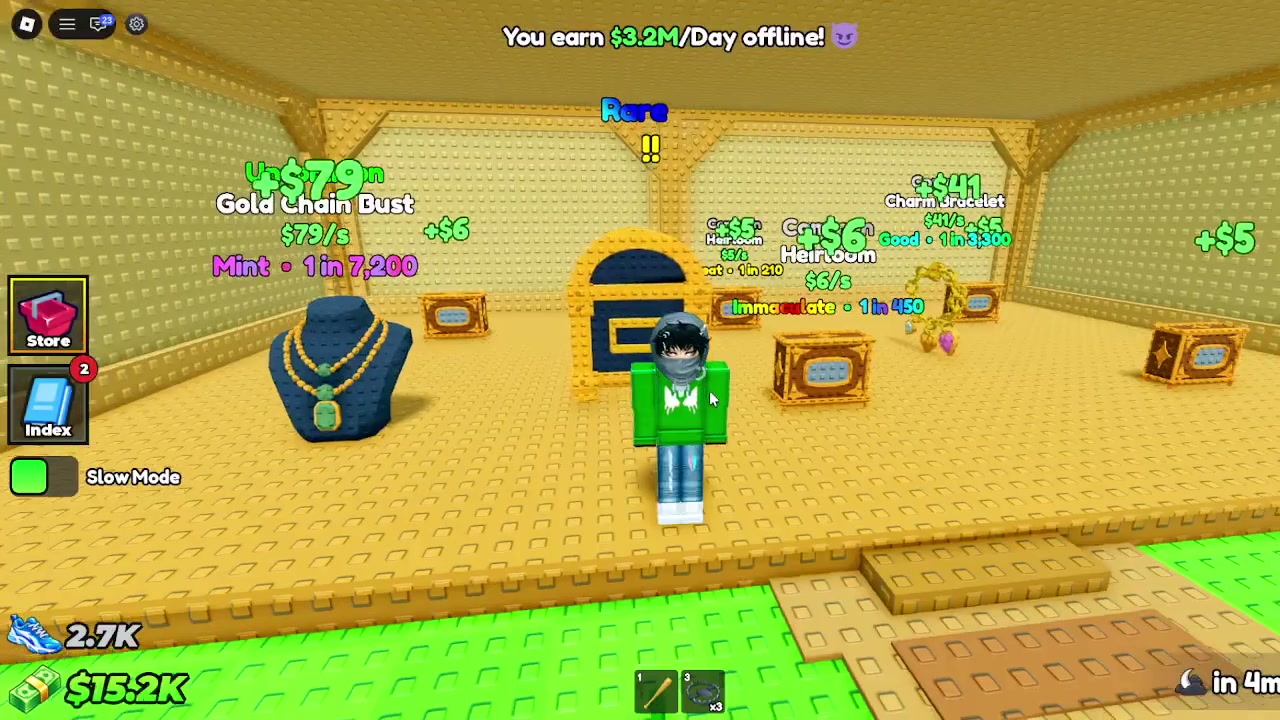
One sampled player screen shows an offline banner of $3.2M/Day and item displays with per-second amounts. The same frame labels a Gold Chain Bust at $79/s and shows Mint with 1 in 7,200. These are screen observations from one player's session, not general rates or a complete catalog.
- Read the item name and value directly from your own display.
- Keep units such as per second and per day attached to the number.
- Record your own base state and check again after a change if you want a personal comparison.
- Use the amount displayed in your server for decisions.
An Appraiser label is not an appraisal guide
A separate crate clip shows an NPC labeled APPRAISER beside an E Open Crate prompt. It does not show an appraisal action, a payout, or an item value change. Those steps need a direct check in the live game.
Use a personal record for comparisons
If you want to understand your own base, note the visible item labels, units, and offline banner at a known time, then compare the same screen after a change. The available sources do not support a universal income formula or item ranking.
Guide notes
Read each item's displayed name and value
Keep per-second and per-day units distinct
Record your own current base state
Check the live screen before spending or estimating
Treat creator HUD values as session examples
Sources and observations
- Official Roblox experience page
Official description of collecting treasures and building, decorating, and upgrading a base.
- Dxnny gameplay video at 00:00:06
One player's offline banner and item display values.
- Foxie Plays gameplay video at 00:00:33
Shows an Open Crate prompt beside an Appraiser label; no appraisal action is shown.