Read each field as it appears
A Dxnny recording shows item names, dollar-per-second values, and additional colored text on the same base display. The visible frame lets you transcribe those fields for that player. It does not explain the extra labels or establish a complete item list.
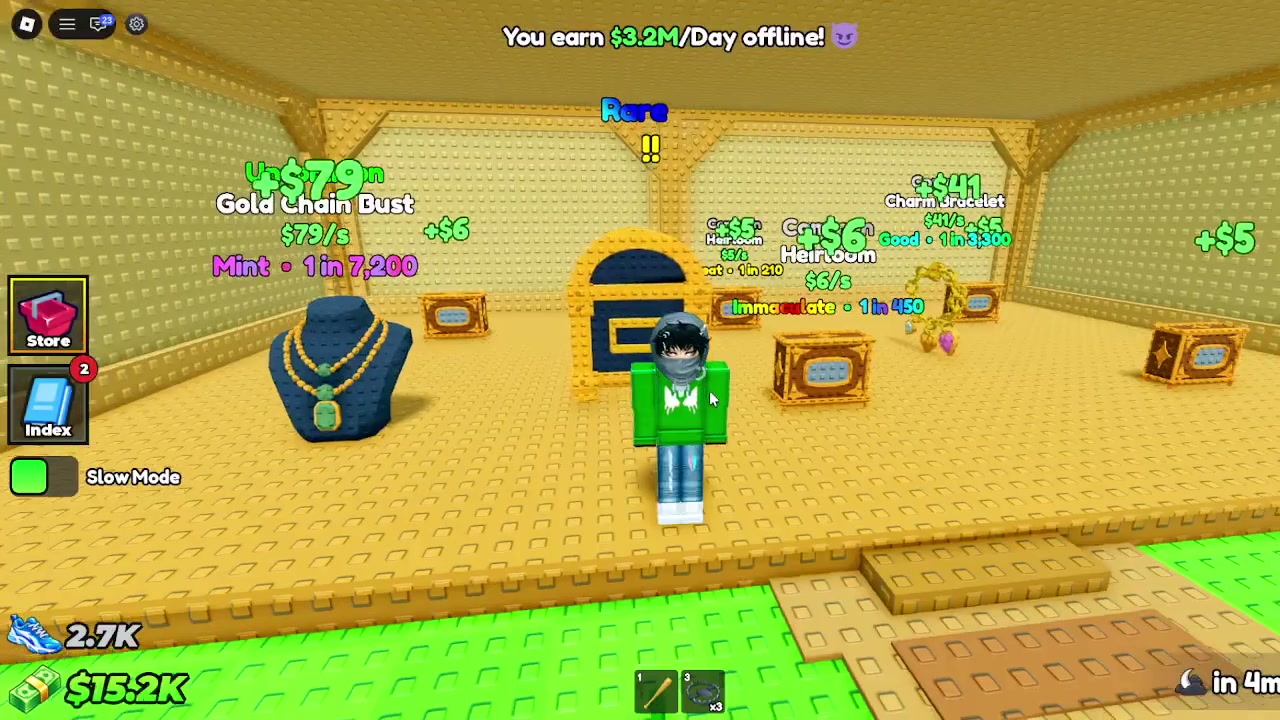
Examples legible in the recorded frame
These entries reproduce the name, rate, and adjacent label visible in one player session. The values can change with a player’s base or game updates.
- Gold Chain Bust
- $79/s · Mint · 1 in 7,200
- Charm Bracelet
- $41/s · Good · 1 in 3,300
- Hair Comb
- $6/s · Immaculate · 1 in 450
Keep rates and extra labels separate
The source frame also shows an offline banner in dollars per day. That unit is different from the per-second values above. The video does not define whether Mint, Good, Immaculate, or the adjacent 1-in-N figures describe a modifier, chance, or another system.
Make your own current record
If you compare items in your base, copy their names and units exactly as displayed and include the date and the server context. Use a new screen capture after a game update or base change. The available source does not support ranking items by value or explaining how to obtain a label.
Guide notes
Read the item name
Keep the displayed $/s unit attached
Copy the colored label exactly
Treat every number as one recorded session
Check your own display before comparing items
Sources and observations
- Official Roblox experience page
The experience description confirms collecting valuable items and treasures. It does not publish an item catalog or explain display labels.
- Dxnny gameplay video at 00:00:06
One player base screen with item names, per-second values, colored labels, and an offline banner.